First of all, congratulations on the release of Mosaic Builder. The structure of your design system and class system is outstanding, and the intuitive components and overall UX are truly impressive.

Dennis
Web designer and developer

Build a section once and place it on every page that needs it. Edit it once and every copy follows, or give one copy its own text and styles while it stays linked.

What a component is, how to create one and reuse it across your pages, how to edit and style single instances on their own, and how nested components work in practice.
Here is a call to action turned into a component, placed on several pages, edited once for all of them, then changed on one page only, and put back again.
Turn any section into a component with a right-click or Ctrl+K, then find it in the Add panel and drop it onto any page.
Change the layout, text, or styles in the component once, and every instance on your site picks up the new version.
Give a single instance its own text or styles with nothing to set up. Reset it later, or detach it when it should go its own way.
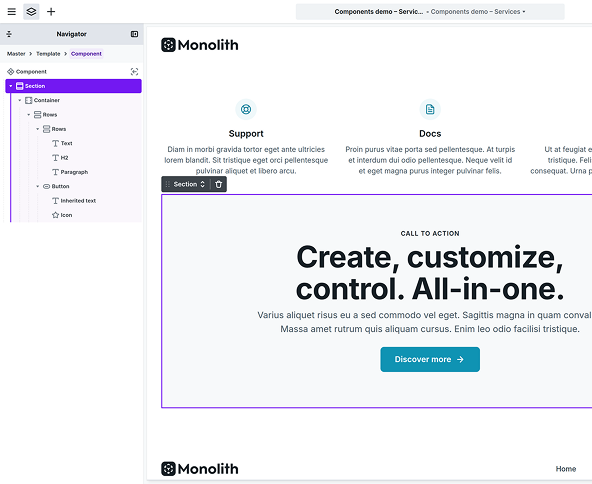
Edit the component and the whole site changes, edit an instance and only that page does. Here is what that means in practice, so a change lands where you meant.
Every instance follows it, apart from values a copy has overridden
Only that copy changes, and every other copy stays as it was before
You decide each time whether a fix is for the whole site or one page
New wording reaches every instance that still uses the original words
Overrides the text only, while its styles still come from the source
Swap the words on one page and keep the design linked to the rest
A new style reaches every instance that hasn’t overridden that value
Overriding one value, like the color, leaves every other style linked to the source
One darker card on one page doesn’t need a second component
Shows the classes and variables you set on each of its elements
Shows each inherited value with its variable name, since version 1.0.11
You see what a copy still takes from the source and what it changed
Opens in its own purple scope, so you know you’re at the source
Named after its component in the Navigator, so you know its origin
You don’t change every page by accident when you meant just one
Designers and developers building real sites with Mosaic, on what components changed in their work, in their own words from emails, Discord, and our pricing page.
First of all, congratulations on the release of Mosaic Builder. The structure of your design system and class system is outstanding, and the intuitive components and overall UX are truly impressive.
What I appreciate most is that Mosaic teaches good practices without forcing them. After using it for a while, my workflow became much more structured and consistent.

Once created something as component, I can immediately edit the content without the need of connecting the properties… AWESOME!

The Mosaic interface is organized and logical. In many page builders you constantly switch between tabs searching for CSS properties and settings, but in Mosaic the parameters are exactly where I expect them to be. Its library of blocks and pages, well designed class system, components, and interaction engine allow me to build complex and beautiful pages in hours instead of days.
I recently discovered Mosaic Builder and I'm really excited to dive in and explore what I can create. The components feature is what excites me most…
For larger projects, Mosaic makes a big difference. The structured approach to styling, variables, and reusable elements makes maintaining websites much easier over time. I also really like the lifetime one-time payment option. It feels like a solid investment for a builder I plan to use on many future projects.

Use a component for anything you repeat inside your pages. Your header, your page layouts, and the ready-made designs each have their own tool.
Your own designs, built once and placed anywhere, with each copy editable on its own.
The shared frame of your site, such as the header and footer, shown on every page that uses it.
The layout for one page or a whole type of page, like every blog post, set inside a master.
Your theme’s ready-made pages, blocks and parts, each with a live preview to check first.
Straight answers on what components do today and where they stop, from moving them to another site to who can edit them, so you know where you stand.
It is a piece of design, such as a call to action, a pricing card, or a whole section, that you build once and reuse on many pages. Unlike a pasted copy, it keeps a link to its source, so when you fix the source, every place it appears gets the fix too.
We use cookies to improve your experience, analyze traffic, and personalize content. By clicking "Accept all" you agree to storing them on your device. Read our privacy policy.