Fewer plugins to update across all your client sites

Mosaic is a visual WordPress theme builder. Your design system, forms, modals and sliders live in one plugin, so each starter site you clone starts lighter.

Client sites stay live
even if your license lapses
Form plugin Popup plugin Slider plugin CSS framework Plugins Mosaic Active Form Modal Slider Classes & variables

What your starter site no longer needs

Your form, popup and slider plugins and your CSS framework, all covered by Mosaic instead.

From the first page to sign-off

The hours on a fixed-price client site go into setup, page building and the round of changes before sign-off, and those are the stages Mosaic shortens for you.

Classes
Style variables
Components
Instance overrides
Templates
Masters
Page kits
Library search
Forms
Mailchimp
MailerLite
Webhooks
Modals
Sliders
Tabs
Accordions
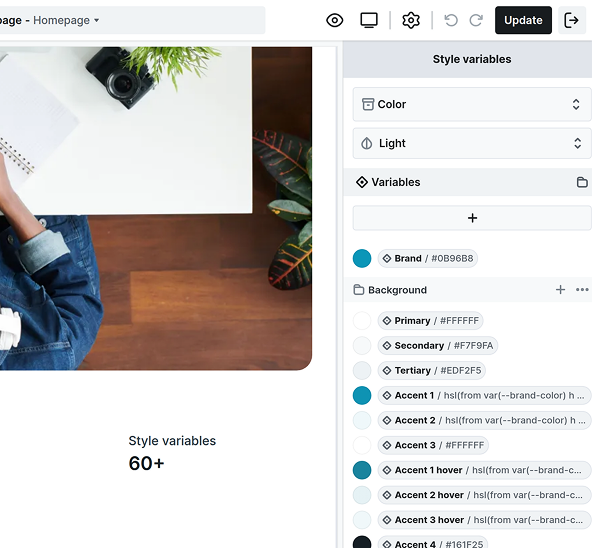
Mosaic editor with the Style variables panel open, showing a starter site's Color collection in Light mode: a Brand color, Primary, Secondary and Tertiary backgrounds, and Accent colors built from the brand color, next to a card that reads "Style variables 60+".

Your system, set up once

Your classes, style variables, components, and templates sit in the theme inside your own starter site.

  • Clone it with the migration plugin you use

  • Or export the theme as a zip for a new install

  • Or begin from the Gibraltar or Monolith kits

  • No CSS framework to buy on top of it

Pages from parts you have

Every full theme comes with page kits, pages, blocks and parts, and adding one never replaces your layout.

  • Page kits for dentists, real estate and more

  • Search the whole library from the add panel

  • Turn your own sections into components

  • Headers and footers kept in masters

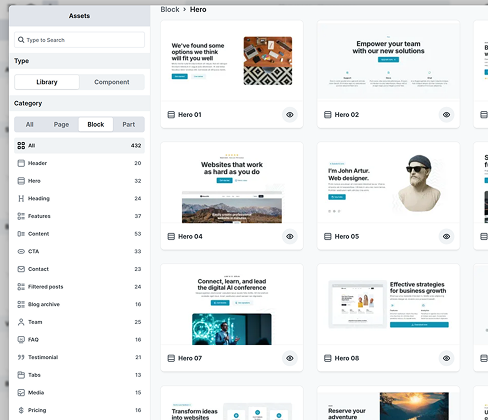
Mosaic Assets panel with the Library tab and the Block category open, filtered to Hero: a grid of ready-made hero designs like Hero 01, Hero 04 and Hero 07, each with a preview button, next to a category list that runs from Header and Hero to FAQ, Testimonial and Tabs.
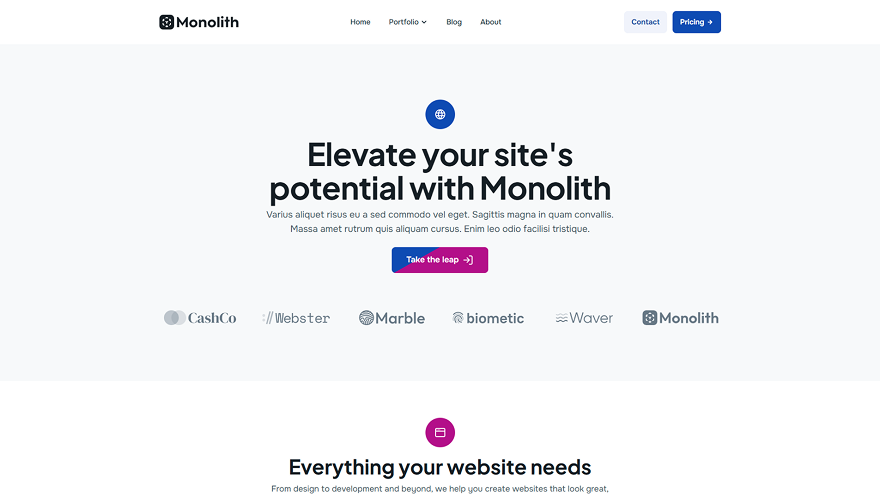
A website built on Mosaic's Monolith theme, showing the hero "Elevate your site's potential with Monolith" with a navigation bar, a call to action button and a row of client logos, styled by the theme's brand colors, fonts and spacing.

Revisions without the rework

When the client changes a color, a font or the spacing in week three, you change it once and every page follows.

  • Change one variable and every use follows

  • Restyle a class and every element updates

  • Override one instance, reset it later

  • Light and dark modes for your colors

The parts plugins used to add

Forms, modals, and sliders live in the main panel, interactions are built in, and client sites need fewer plugins.

  • Forms to email, Mailchimp, MailerLite or a webhook

  • Modals on exit intent or at a scroll depth

  • Sliders, tabs and accordions

  • Maps with no API key to set up

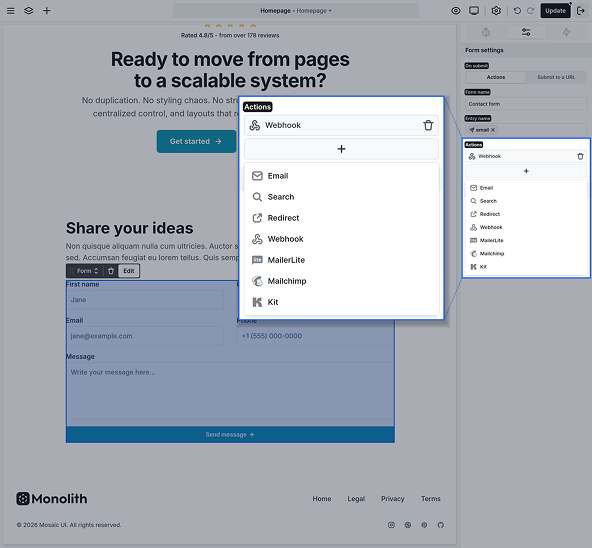
Mosaic editor with a contact form selected and its Form settings open: a Webhook action is set up, and the actions list offers Email, Search, Redirect, Webhook, MailerLite, Mailchimp and Kit.

Easy to keep current

After launch, the site moves onto your care plan, and the work there should be routine updates and small changes, not fixing things that broke.

Redesign it on the live site, privately

Test mode shows a theme only to you, while the client's visitors keep seeing the live site, so a redesign needs no separate staging copy.

Updates that leave your work alone

Updating or reinstalling Mosaic won't overwrite your theme or any of your work, and it updates from the WordPress dashboard like any other plugin.

Works with your caching plugin

Mosaic automatically keeps its critical scripts out of delayed loading in WP Rocket, LiteSpeed Cache, Perfmatters and Autoptimize, where they allow it.

Clients write in the editor they know

Your client writes posts and pages in the block editor, and your theme's Gutenberg styles give everything they add the look of the rest of the site.

Real takes from builders

What freelancers, creative directors, and site builders noticed about starting client projects, building pages faster, and keeping the sites they ship easy to maintain.

Mosaic stands out as one of the most efficient WordPress builders I've used. Everything feels streamlined, from the interface to the way layouts and styles are handled. It lets me work faster without sacrificing control or quality. Solid performance, thoughtful design, and a tool I now rely on for every project.

Bernard Lee

Founder & Creator, Data Analyst

My starter site used to be the builder plus a CSS framework and a forms plugin, all cloned into every new client site. Now the classes and variables are in the theme and the forms are built in.

Jonas Reed

WordPress freelancer

The design library saves a huge amount of time when starting a project. Instead of building everything from scratch, I can start with well-designed sections and adapt them to my needs.

Daniel Hartmann

Freelance web designer

After I started with Mosaic Builder, I was very happy with the very clean UI and then blown away by the UX. It feels totally different from page builders like Elementor or Divi and sits outside of the bloated code ecosystem. Mosaic is super fast, super clean, and will be the builder for my next projects.

Valentin Lyong

WordPress site builder, SEO specialist

For larger projects, Mosaic makes a big difference. The structured approach to styling, variables, and reusable elements makes maintaining websites much easier over time.

Oliver Bennett

Creative Director

A client's contact form used to go through a separate CRM connector plugin. I set it up as a webhook on the Mosaic form instead, and every entry still lands in their CRM like before. That plugin came off, so there's one less thing to update on that client's site every month and one less license to renew for them every year.

Anna Brooks

WordPress developer

Still here for your next project

Your builder should last through every side project to come, so it matters who makes it. Mosaic comes from the team behind Smart Slider 3, and updates keep coming.

2012
The year Nextend began

Nextend, who make Mosaic, have built plugins for more than a decade.

800,000+
Sites running Smart Slider

Our slider plugin powers more than 800,000 websites around the world.

10
Releases since March

Mosaic 1.0 came out in March 2026, and nine updates have followed.

1 day
Typical email reply

Email questions are typically answered within one business day.

Watch a site come together

An independent reviewer builds a full site from a page kit, then the Mosaic team builds forms with no separate plugin and rebrands a whole site from its variables.

Video thumbnail from WPTuts reading "Build your first Mosaic website fast", with Paul pointing at the title, for his walkthrough of building a full Mosaic site from a page kit.
A full site from a kit

The setup wizard and a page kit, then a whole site with its master, header and footer.

WPTuts
•
24 min
Video thumbnail from the Mosaic Builder channel reading "Build a form", showing a form layout linked to field and spam protection icons, for the walkthrough of building WordPress forms in Mosaic with no separate plugin.
Forms without a plugin

A contact form and a registration form, with a captcha and submissions in the editor.

Mosaic Builder
•
11 min
Video thumbnail from the Mosaic Builder channel reading "Style variables", showing one variable branching into color, typography and spacing icons, for the walkthrough of rebranding a site from its style variables.
A rebrand in one place

Colors, fonts, and spacing set once as variables, then changed in one place, with modes and skins.

Mosaic Builder
•
9 min

Common questions, clear answers

Straightforward answers to what builders ask first: starter sites and moving work between them, the plugins you still add, client access, licenses and what happens if you stop paying.

Starter sites
Plugins
Client work
Before you buy
Can I clone my starter site for each new client?

Yes, with the migration plugin you already use. Each installation is activated on its own, so once the clone sits on the client's domain, you activate Mosaic there and carry on building the site.

Your cookie preferences

We use cookies to improve your experience, analyze traffic, and personalize content. By clicking "Accept all" you agree to storing them on your device. Read our privacy policy.