Tired of your design getting lost in the build?

Mosaic is a visual WordPress theme builder that works like your design tool, so you build every page and screen size yourself, exactly the way you designed it.

No Mosaic badge
only your design ships
TUTORIALS Create stunning, seamless websites easily Leo Arcand Jan 10, 2026

One card, built the way you design

Its colors and type come from variables, its layout comes from flex with a gap, and the card itself is a component you reuse on every page.

The tools you design with

They work much like they do in your design tool, except the result is the site your visitors use, rather than a file that someone else has to rebuild.

Color variables
Collections
Modes
Skins
Typography variables
Components
Overrides
Masters
Classes
Variants
Hover states
Flex
Grid
Breakpoints
Custom media queries
Sticky positions
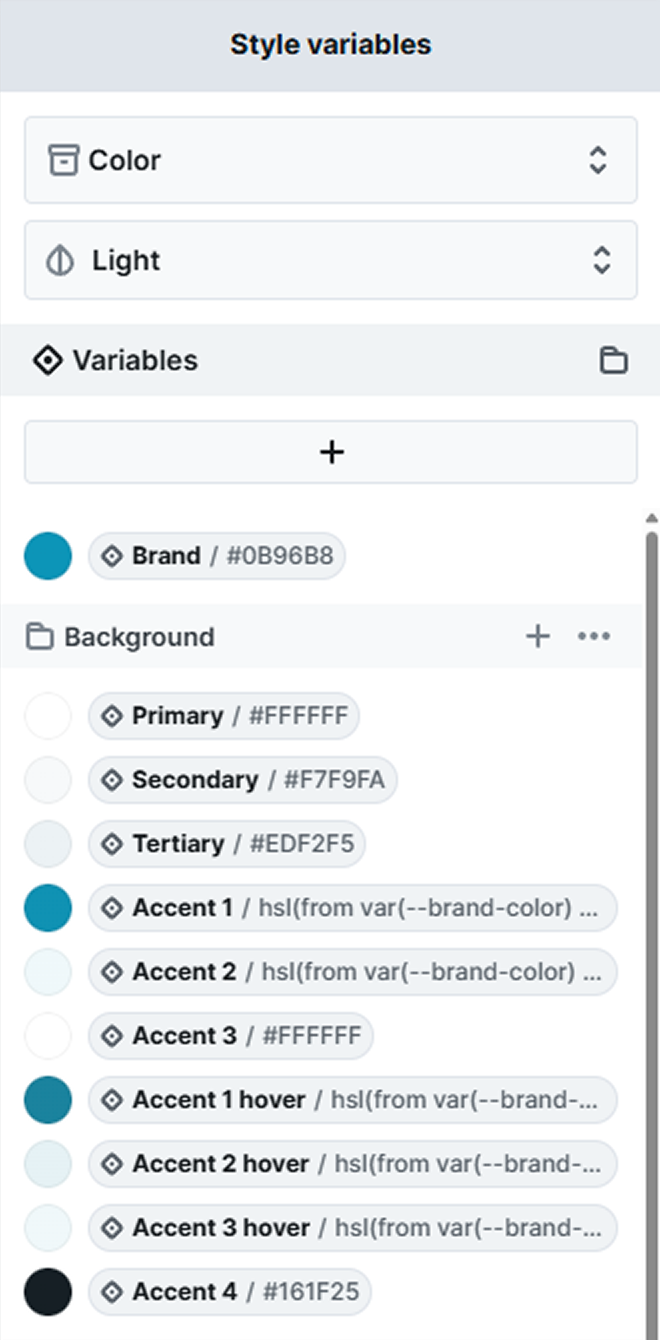
The Style variables panel in Mosaic, the WordPress theme builder for designers, with the Color collection open in Light mode, a Brand variable set to #0B96B8, and a Background group holding Primary, Secondary, Tertiary and Accent 1 color variables

Variables in collections

Colors, type, spacing, radius, and shadows live in variables, grouped by type into collections and named the way you want, so a single change reaches every element using it.

  • Modes you set up in each collection

  • Elements inherit the mode of their parent

  • Skins for alternate sets of values

  • Typography variables for size and line height

Components with overrides

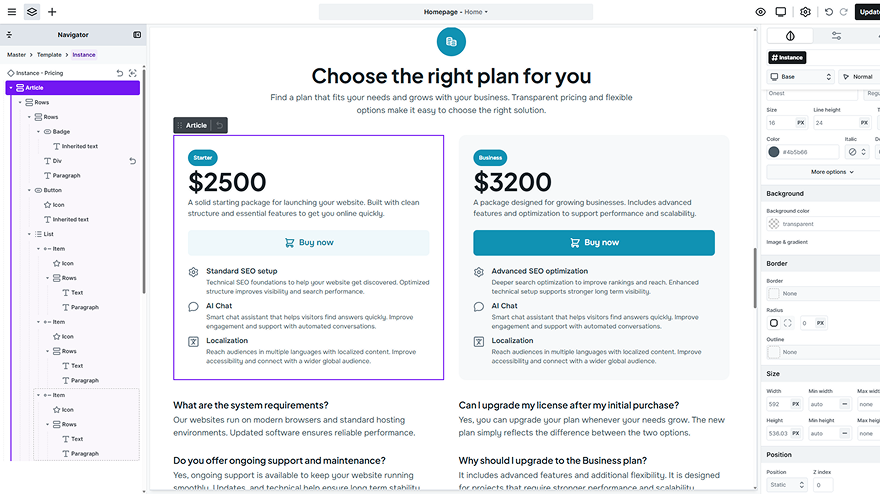
Turn a card or a hero into a component, edit one instance where it needs to differ, and keep headers and footers in a master, so every page built on it shares them.

  • Reset an instance back to its component

  • Detach an instance to make it unique

  • Classes, variants and hover states

  • Gutenberg styles for the blocks in posts

The Mosaic editor with a pricing card instance selected, the Navigator showing its Master, Template and Instance path with an override marked on one element, beside a pricing page whose Starter card is highlighted as the edited instance
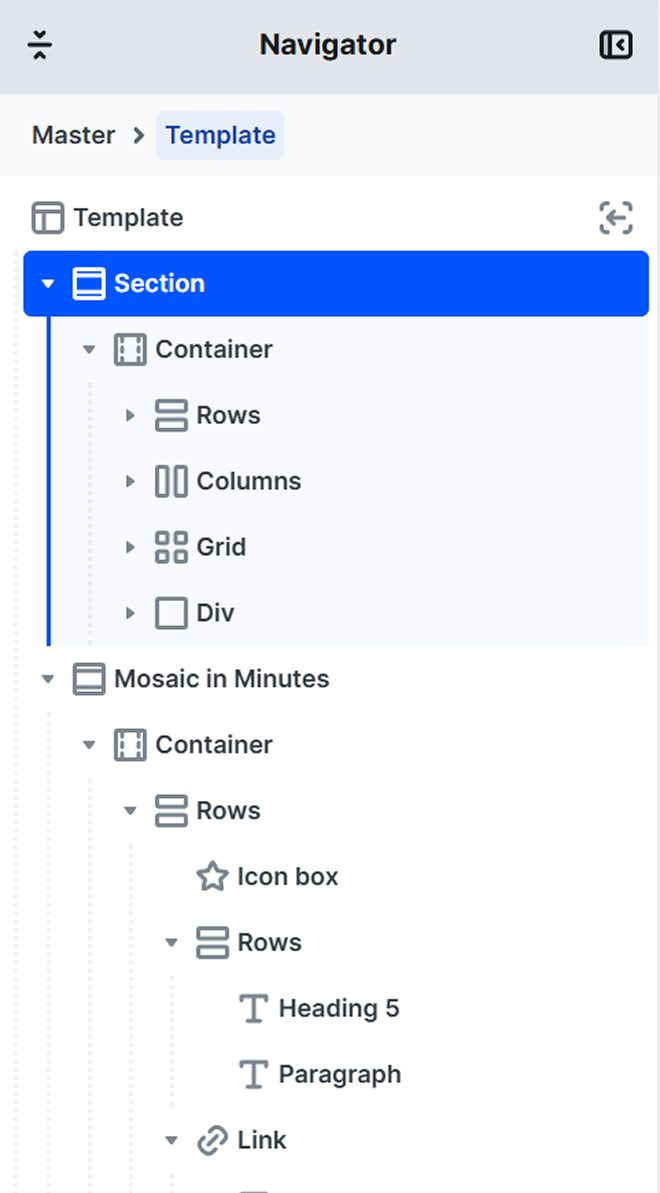
The Mosaic Navigator showing a template's layout structure, with a selected Section holding a Container of Rows, Columns, Grid and Div layout elements, and a second section below built from a Container, Rows and an Icon box

Layout with flex and grid

Set direction, gap and alignment on a flex container, or draw a responsive grid with named areas, fr columns and auto fit. Then add sticky, masks and blend modes.

  • Backdrop filters behind any element

  • Aspect ratio and object fit on media

  • Sticky positions that hold on scroll

  • Units in px, rem, em, %, vw and vh

Every breakpoint, adjusted

Base styles apply everywhere, and tablet and mobile come set up for you. Every style you change at one size is marked, so you always see what differs there.

  • Add a breakpoint for any width you need

  • Choose up or down for each breakpoint

  • Tablet at 1079px, mobile at 767px

  • Custom media queries when a size needs one

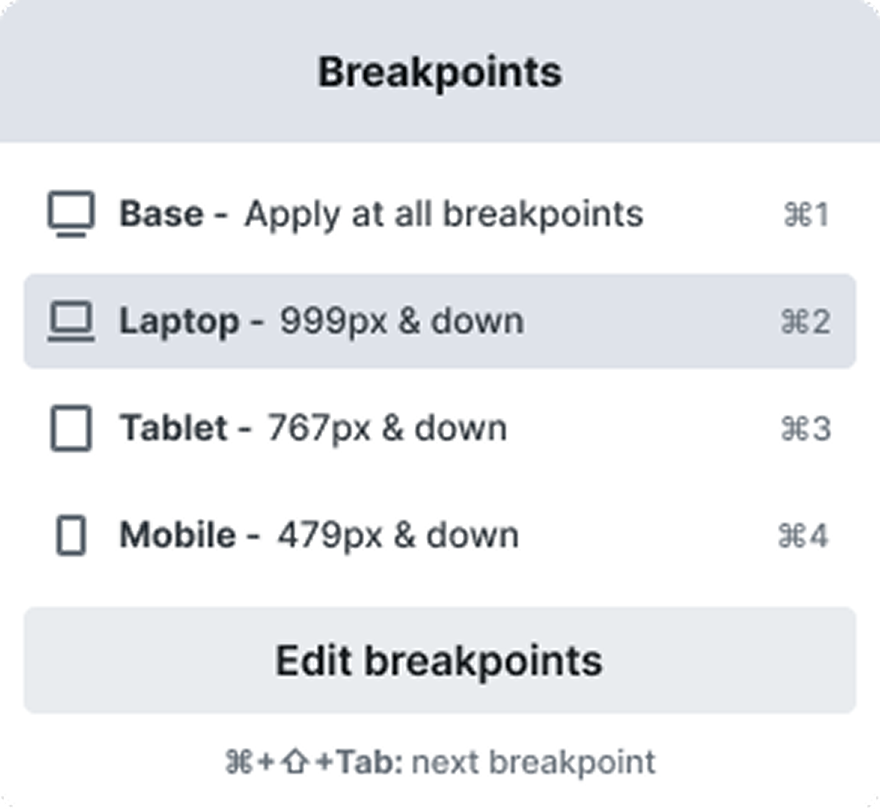
The Mosaic Breakpoints menu with Base applying at all sizes, plus Laptop at 999px and down, Tablet at 767px and down and Mobile at 479px and down, each with its keyboard shortcut, and an Edit breakpoints button below

Interactions without any custom code

Effects that usually take custom code, a script or an extra plugin are set up visually, right inside the editor, so you don’t need any extra tools.

Triggers for every kind of moment

Start an animation on scroll into view, scroll depth, hover, click, page load or exit intent, or let it follow the cursor and the scroll as they move.

A timeline for every step

Drag each step into order on the timeline, adjust the delays between keyframes and resize them to change the duration, then preview it on the canvas.

One interaction for a whole class

Target a class instead of a single element, and every element that shares that class runs the same animation, without setting it up again on each one.

Colors and filters that change in motion

Animate translate, scale, rotate, opacity, filters, and colors, so one element can grow, fade in and shift its color in a single step as it plays.

Real takes from designers

What designers noticed about the editor, working in variables and components, the learning curve, owning the site and how a layout comes together on a phone.

When I first tried Mosaic Builder, the first thing that shocked me was how smooth the builder is. Clicking between items, components, layouts, and elements feels incredibly fluid, everything responds instantly without any lag. The UI/UX is very well thought out. The interface is clean, organized, and free of clutter. Interactions and animations are another highlight.

Jornes Sim

Designer

I’m more designer than developer, and there was a learning curve. But the panels use words I already know, like gap, padding and breakpoints, so it clicked.

Adam Ross

Brand designer

Now I can design quickly for the web while knowing that the mobile experience is just a few adjustments from also working and looking great. Mosaic is visual, fast, well designed and makes me feel in control of the results without needing to be a developer.

Tim Cerami

Owner, T/C Design

I set up my colors and type as variables, the same way I do in Figma, and turned my cards and buttons into components with overrides. When something needs to change, I change it once. Now the site finally matches my design file, because it’s built the same way the file is.

Eva Lindqvist

Brand and web designer

For larger projects, Mosaic makes a big difference. The structured approach to styling, variables, and reusable elements makes maintaining websites much easier over time. I also really like the lifetime one-time payment option. It feels like a solid investment for a builder I plan to use on many future projects.

Oliver Bennett

Creative Director

I moved my portfolio off a hosted site builder because I didn’t want to keep renting my own work. Now it’s a theme on my own WordPress hosting, I can export the whole design as a zip, and the site keeps working even if I stop paying.

Marco Bellini

Freelance photographer

Start from a designed theme

Gibraltar, Monolith, and Blank each come with a library styled to match the theme, so the first layout you open is a finished design to reshape, not an empty canvas.

Page kits
8
Page
55
Block
398
Part
35

See the design system built

Short walkthroughs from the team that makes Mosaic, plus a sponsored review by Jeffrey from Lytbox, opened at the chapter where he sets up the variables.

Video thumbnail for the Mosaic Builder walkthrough on style variables, showing color, typography and size icons branching from a single variable on a dark purple background
Variables, modes and skins

Creating variables, sorting them into collections and groups, then adding modes and skins.

Mosaic Builder
•
9 min
Video thumbnail for the Mosaic in Minutes tutorial on a timeline on scroll, with a vertical progress line and a glowing marker moving past a column of cards
A scroll timeline

A sticky icon, fade-ins, an icon color change and a progress bar, set up on the interaction timeline.

Mosaic Builder
•
12 min
Video thumbnail for Jeffrey from Lytbox's review of Mosaic's classes, variables and components, with Jeffrey beside the Mosaic editor open on a Monolith theme page
A web designer’s take

Themes, variables, classes and components, from a web designer who runs Lytbox Academy.

Jeffrey @ Lytbox
•
17 min

Common questions, clear answers

Straightforward answers to what designers ask first: importing a design, variables, fluid type, CSS, reusing a design, redesigns, client edits, AI and licensing.

Design system
Building
Workflow
Before you buy
Can I import my Figma, Webflow or Framer design?

Not today. There is no importer from Figma, Webflow or Framer, and style variables can’t be imported on their own, so rebuild your palette and type as variables first, then the pages.

Your cookie preferences

We use cookies to improve your experience, analyze traffic, and personalize content. By clicking "Accept all" you agree to storing them on your device. Read our privacy policy.