

Theme builder vs page builder: which one?

In a theme builder vs page builder choice, the page builder designs the pages you create, and the theme builder designs the whole site, from the header to every post.

Get Mosaic
Two names, two jobs

Page builder and theme builder sound alike, so it’s easy to pick the one that can’t do what your site needs, and only find out later.

Page builders stop at pages

Choose only a page builder, and the pages you design get the new look, while your blog posts and archives keep the theme’s old design.

Styles kept in two places

Add a page builder to your theme, and your fonts and colors live in two separate panels that can clash, so one fix often means two edits.

The words to know first

Guides and forums use these words loosely, and that is where most of the confusion starts. Here is what each one means on a WordPress site, in plain terms.

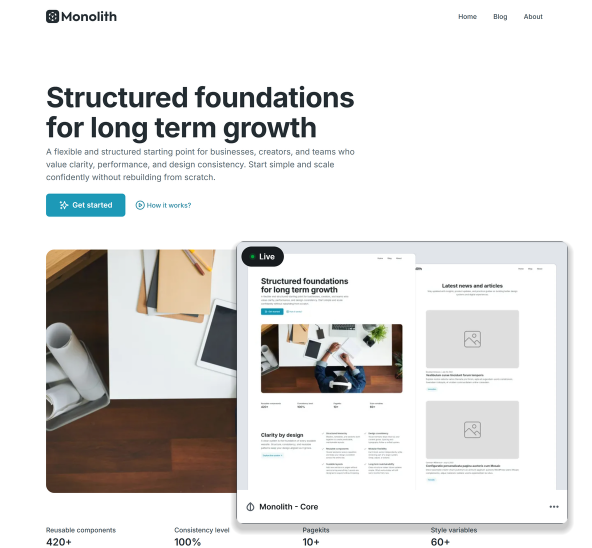
The Monolith theme for Mosaic Builder applied to a WordPress site: the homepage with the heading “Structured foundations for long term growth”, a Get started button and a desk photo, with a smaller live preview in front showing the same theme’s header, layout and blog posts.

Theme

Decides how the whole site looks.

  • A site runs one active theme at a time

  • Classic and block themes work in different ways

  • Switching it changes how posts look, not what they say

Template

The layout for one type of page, filled with the right content.

  • Blog posts usually share a single template

  • WordPress picks the right one for each page shown

  • Some guides use it for a ready-made page design

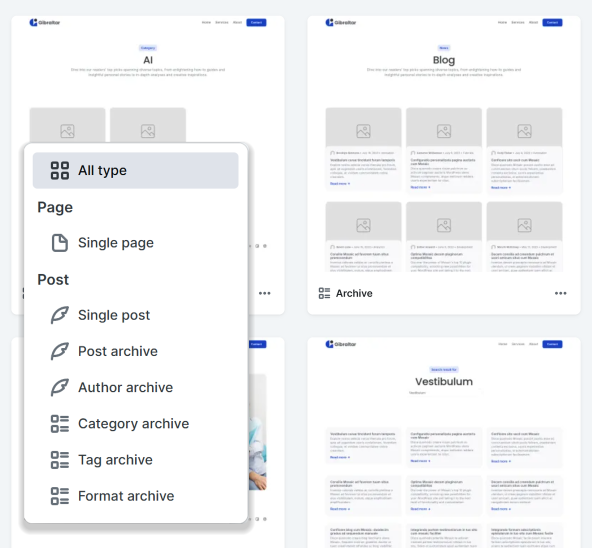
Template cards in Mosaic Builder, with archive layouts for an AI category and the blog, and an open template type menu listing Single page, Single post, Post archive, Author archive, Category archive, Tag archive and Format archive.
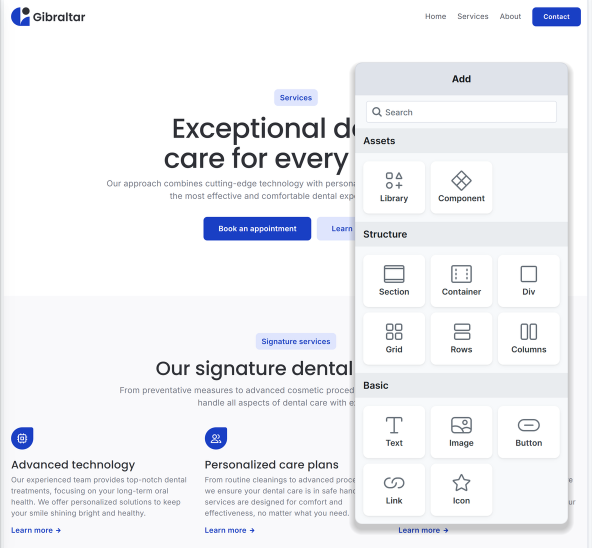
How a page builder works: a dental services page built section by section, with the Mosaic Builder Add panel open showing structure and basic elements

Page builder

A visual editor for the pages you create, section by section.

  • You place sections and style them one by one

  • The theme still decides the header and footer

  • Elementor and Beaver Builder are well-known examples

Theme builder

A visual editor for the theme itself, the whole site in one place.

  • Covers the header, footer and every template

  • Some are themes, some add on to one, others replace it

  • Mosaic adds shared classes and variables on top

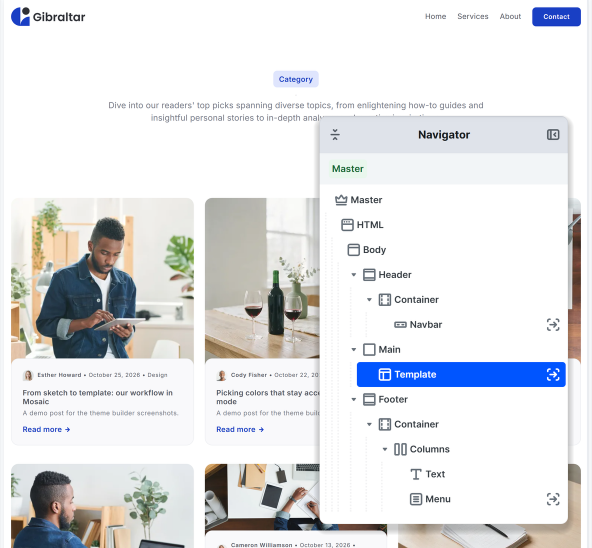
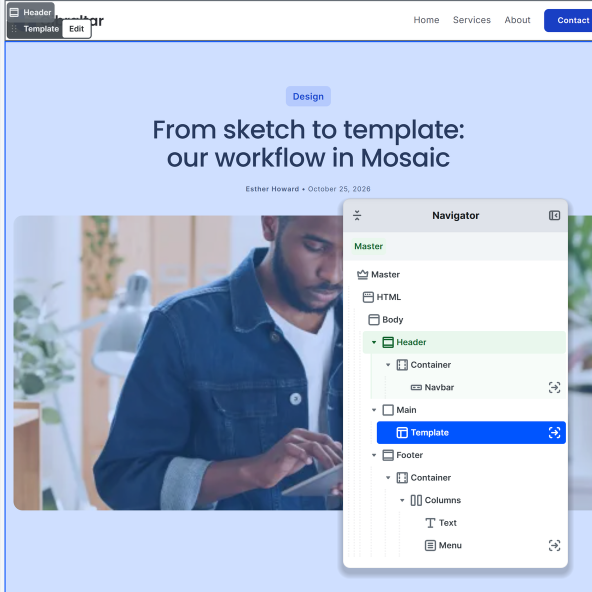
Theme builder vs page builder in practice: a blog category archive designed in Mosaic Builder, with the Navigator showing the master’s header, template and footer

How far each tool reaches

Two views of the same WordPress site. On the left, everything a theme builder designs. On the right, the part a page builder can open and change.

Theme builder vs page builder: what a theme builder reaches on a dental clinic site, every page designed, from the homepage, services, about and contact pages to the blog post, category archive, search results and 404 page

What a theme builder reaches

All of it: the header and footer around every page, plus the blog posts, archives, and search results that WordPress puts together for you from your content.

Theme builder vs page builder: what a page builder reaches on the same site, only the homepage, services, about and contact pages designed, while the blog post, category archive, search results and 404 page keep the theme’s default look

What a page builder reaches

The pages you make yourself. Everything WordPress builds around them keeps your theme’s look.

What each one covers

A side-by-side look at what each tool covers, how it works day-to-day, and what each difference means for your site once it’s up and running.

Feature
Page builder
Theme builder
What this means for you
What you design

The content of each page you create, from its first section to the last

The whole site, including the parts that wrap around every single page

With a page builder alone, the rest of the site keeps your theme’s look

Where it lives

A plugin that works inside whichever theme happens to be switched on

Part of a theme, an add-on that sits over one, or a plugin that replaces your theme

A theme builder takes over some or all of the job your theme used to do on its own

Header and footer

Usually left to the theme, unless the builder offers theme tools too

Built once in a shared layout, then placed around every page on your site

Change the menu in one place and every page shows the new one at once

A style change

Reaches the pages built in the builder, while the theme’s parts keep theirs

Can reach every page and template at once, since they share the same styles

A rebrand happens in one place, not across pages and theme settings

New blog posts

Take the theme’s post layout unless you design each post on its own

Use the post template the moment you publish, with nothing to redo

Every new post looks like the rest of your site, without any extra design work

Archives and search

Whatever your theme ships, since the page builder alone doesn’t reach them

Designed once like any other page, then filled in with your posts automatically

Visitors landing on a category page see your own design, not a plain default one

Extras you may need

A Pro plan, a theme add-on or a header plugin, each with its own renewal

The header, templates and dynamic content all come with the tool itself

Fewer plugins to update, and fewer licences to renew every year

Getting started

Quick: install it, open a page and start placing sections right away

Slower on day one, since you plan the header and templates up front

A theme builder asks more of you at the start and gives it back later

Pick by the site you build

A page builder is fine for some sites, and a theme builder saves real time on others. Find the case closest to yours and see which signs point to which tool.

A single landing page

One campaign or sales page on a site whose theme already looks right, so only that page needs a design of its own.

A page builder is enough
  • The page stands on its own, away from the blog
  • Your theme already covers the rest of the site
  • You won’t reuse the layout on many more pages
  • The block editor might already be all you need
A blog or content site

You publish a lot more often than you redesign, and every new post should look finished from the moment it goes live on your site.

Go with a theme builder
  • New posts go out every week or every month
  • Readers land on posts more than on the homepage
  • Custom post types need a layout of their own
  • Fields from ACF belong in the design itself

Sites for clients

You build the site and hand it over, and the client keeps adding new pages and posts long after you have moved on to the next project.

Theme builder with a design system
  • Clients add pages without breaking the look
  • Several sites start from the same base
  • Late brand changes shouldn’t eat up a week
  • Others need to read your structure later on

A site already on a theme and a builder

It still works, so the question is timing: a switch means rebuilding the design, while your posts, pages and media stay in WordPress.

Switch at the next redesign
  • A redesign is already on this year’s list
  • Renewals for several add-ons keep adding up
  • You pay for a Pro plan just to get a header
  • You’d rather rebuild once than keep patching

One plugin for the whole site

Mosaic builds the theme, the templates, and your pages in one editor, and all of them share the same fonts, colors, and classes, so every part of the site stays consistent with the rest.

A blog post designed in the Mosaic Builder editor, with the header marked as part of the master and the post content as the template, while the Navigator lists the master’s header, navbar, template and footer.
Its own theme

One plugin brings its own theme, which you design yourself instead of working around a theme.

Masters and templates

The master holds the header, footer, and menu, while templates design each type of page on your site.

Classes and variables

Fonts, colors, and spacing are set once as variables and classes, then reused everywhere on the site.

Built into your plan

Personal, Creator, and Agency all include the theme builder, with the same building features on each.

What Mosaic builders say

Designers, site builders, a site owner and an agency owner on what changed after they moved their sites to Mosaic, from cleaner workflows to needing fewer plugins.

Far too many places give you blocks but then you have to pay extra for dynamic data, or pay more for the Theme Builder.

Andy Cain

Runs God Centered Theology

When I first visited the Mosaic website, I couldn’t believe it was still in beta because of how polished the animations were. After trying it myself, I was impressed by how smooth the editor felt (especially switching between master and template), how capable the dynamic data already was, and having animations built in natively. That was the moment I knew I wanted to build my own site with Mosaic.

Jornes Sim

Designer

Mosaic brings the experience of a modern design system into WordPress. By using global variables and reusable classes, it creates a much cleaner and more structured workflow. After working this way, most traditional page builders start to feel disorganized and harder to manage.

Rajesh Arya

Founder, Lexjuris Legal Consultants

After I started with Mosaic Builder, I was very happy with the very clean UI and then blown away by the UX. It feels totally different from page builders like Elementor or Divi and sits outside of the bloated code ecosystem. Mosaic is super fast, super clean, and will be the builder for my next projects.

Valentin Lyong

WordPress site builder, SEO specialist

Mosaic is an intuitive and visually well-designed builder that is fast and convenient to work with. For me, it feels easier to understand than Bricks if you do not have a strong coding background, and its interface feels closer to Figma. If you have experience working with design tools, it is quite easy to understand how Mosaic works.

Artur Iudenkov

Runs Yudena, a digital agency

I’m now free to create almost all kinds of animation with no need for external plugins, I can check the changes on the fly with no more waiting time.

Felipe Felix

UI/UX and WordPress designer
Get Mosaic

Before you pick a builder

Short, straight answers on which tools do what, what happens to the site you already have, and what changes for you if you move it over to Mosaic.

What’s the difference between a theme builder and a page builder?

Reach. A page builder works on the content of the pages you make. A theme builder edits the theme itself, so it also covers the header, the footer, and the templates behind every blog post, archive, search result, and 404 page.

Your cookie preferences

We use cookies to improve your experience, analyze traffic, and personalize content. By clicking "Accept all" you agree to storing them on your device. Read our privacy policy.