Debug with a simplified PHP file
Create a PHP file with this code in it:
Code
<?php
// create curl resource
$ch = curl_init();

// set url
curl_setopt($ch, CURLOPT_URL,
"https://api3.mosaicbuilder.com/v1/activate");

//return the transfer as a string
curl_setopt($ch, CURLOPT_RETURNTRANSFER, 1);

$errorFile = dirname(__FILE__) . '/curl_error.txt';
$out       = fopen($errorFile, "w");
curl_setopt($ch, CURLOPT_VERBOSE, true);
curl_setopt($ch, CURLOPT_STDERR, $out);

// $output contains the output string
$output = curl_exec($ch);

curl_close($ch);
fclose($out);

echo "<h1>LOG</h1>";
echo "<pre>";
echo htmlspecialchars(file_get_contents($errorFile));
unlink($errorFile);
echo "</pre>";
Upload it to your FTP, and check the result in your browser:
https://yourwebsite.com/test.php
This will write out a log about what happens when your server tries to connect to ours. If everything is fine, you will see a similar result:
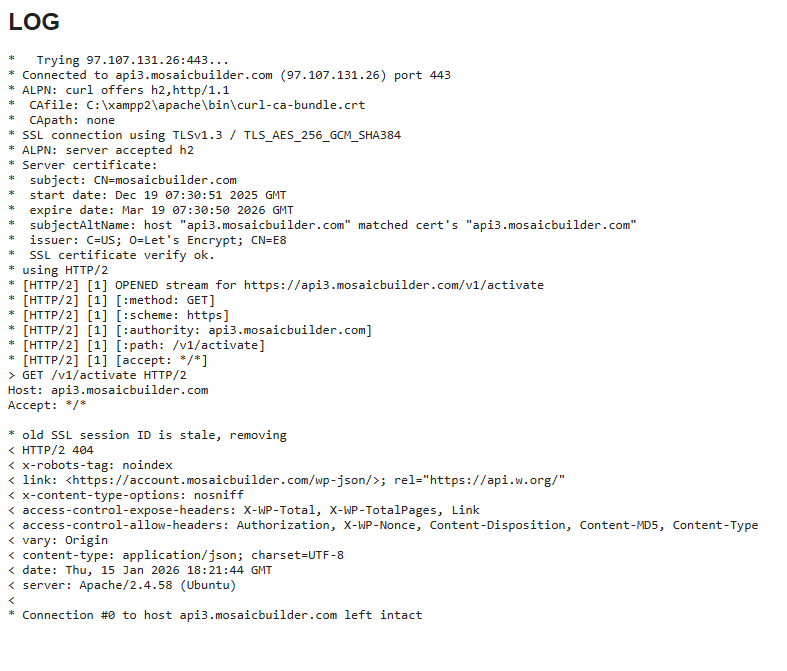
In case you don’t see this, but rather messages indicating an issue, get in touch with your server host! Show them the file and ask them to fix the issue for you, so the connection could happen properly.