What you can use it for
Because you set the value (or capture it automatically from the page’s web address) rather than the visitor typing it, a hidden input is a good fit for information you want on every submission without adding anything to the form your visitor sees. Common uses include:
- Campaign tracking: capture a value such as a UTM tag from the page’s web address, so you can see which ad or link brought in each lead.
- Source or page identifiers: record which page or landing page a form was submitted from.
- Routing keys: send a fixed value that tells a later step, such as an email action, how to handle the submission.
Adding a hidden input
A hidden input renders nothing on the page, so you won’t see it on the editor canvas. To work with one, open the Navigator and select it there. That is where you’ll always find and configure it.
Unlike most form fields, adding a hidden input doesn’t open a setup popover asking for a label, because a hidden input doesn’t have one. It’s inserted into your form straight away, ready for you to give it a value.
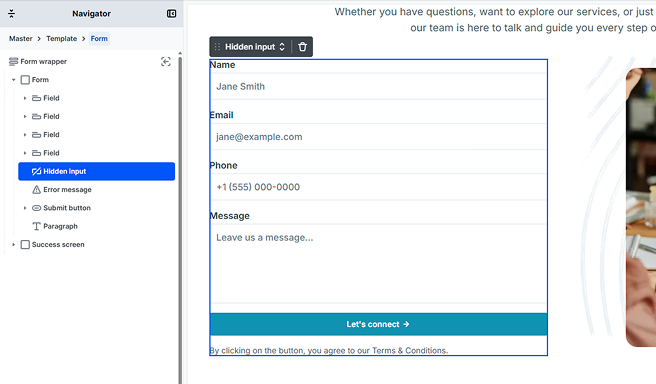
A hidden input has no label, no required or validation options, and no error message. It simply carries whatever value you set, so double-check the value and its name before you rely on it.
Hidden input settings
Select the hidden input in the Navigator to open its settings.
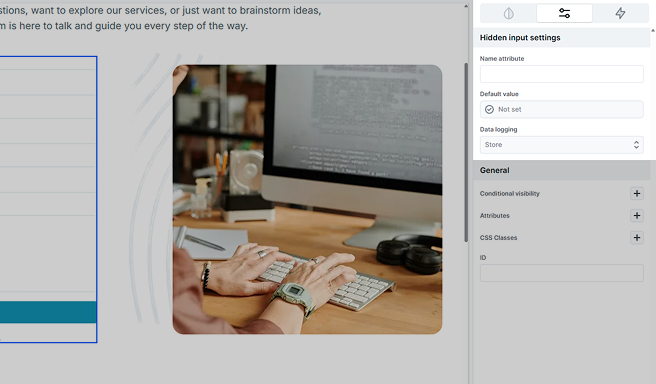
- Name attribute: the key the value is submitted under. It’s how the value is identified in your form submissions and in actions like email, so give it a clear, meaningful name (for example, utm_campaign or source).
- Default value: the value the hidden input submits. This is the only way a hidden input gets a value, since your visitor never interacts with it.
- Data logging: controls how the submitted value is saved with your form submissions.
Setting the value
Everything a hidden input submits comes from its Default value. A new hidden input starts out as Not set, which means it has nothing to submit yet, so choosing a value is what makes the element useful.
You can type a fixed value yourself, or pull one in automatically. A common pattern is to capture a parameter from the page’s web address: if someone lands on your page with ?utm_campaign=spring in the URL, a hidden input can grab spring and submit it with the form. For the full list of value sources and how each one works, see Default values.
Data logging
By default, a hidden input’s value is stored with each submission. If the value is sensitive, the Data logging option lets you hide it in your submissions view or leave it out of the stored data entirely. To learn how data logging works across the whole form, see Form submissions.