The Success screen slot
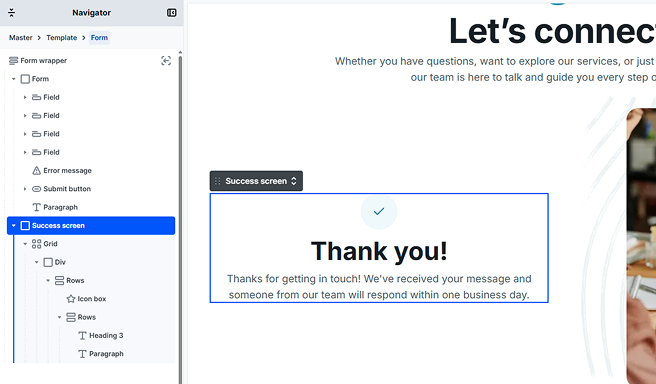
Every form is built from a Form wrapper holding two permanent parts: the Form, where your fields and submit button live, and the Success screen. You will find both nested inside the Form wrapper in the Navigator, and neither can be deleted or reordered.
The Success screen is a content slot, like the slots on the submit button: you cannot style the slot itself, you build your confirmation inside it and style that content like anything else in Mosaic. It comes with a ready-made confirmation already in place, so a new form shows a thank-you message out of the box. Select the Success screen in the Navigator to edit that content, replace it with your own, or remove it entirely.
What visitors see on success
What a visitor sees after a successful submit depends on whether the Success screen has any content:
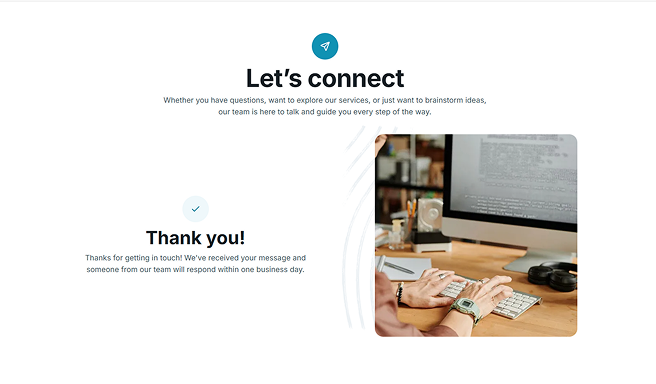
- With content (the default confirmation or your own): the Success screen appears in place of the form, right where the form was. This keeps visitors on the same page and gives them immediate, unmistakable confirmation that everything worked.
- Empty: there is nothing to reveal, so the form simply stays visible after the submit.
Common ways to use it:
- A simple confirmation, such as “Thanks, we’ll be in touch soon.”
- Next steps for the visitor, like “Check your inbox to confirm your subscription.”
- A download link or button that becomes available after submitting.
- A short summary of what happens next.
Building your Success screen
You build the Success screen from normal Mosaic elements. Add anything you like inside it (text, buttons, images, icons), and lay them out and style them exactly as you would anywhere else on your site. Design it in the editor the same way you build the rest of your form.
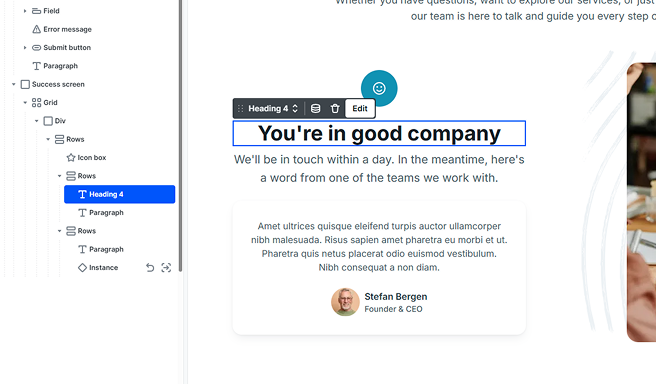
Unlike the Error message, which Mosaic fills with text automatically, the Success screen is entirely yours: Mosaic only reveals the content you have built. That is why it is a “screen,” not a “message.”
Success screen and redirects
The Success screen is for confirmations that keep visitors on the current page. If you would rather send visitors to another page after submitting (a dedicated thank-you page, a checkout, or any other URL), use a Redirect action instead.
When a form has both content in its Success screen and a redirect that applies, the redirect takes over and the Success screen is not shown.
Accessibility
When the Success screen appears, Mosaic automatically moves focus to it and announces it to screen readers, so people using assistive technology are told the submission succeeded, with no extra setup on your part. You can read more in Accessibility support.